

Artificio Unveils No-Code SAP App Builder for Custom Forms and Screens Without ABAP or Fiori Developers
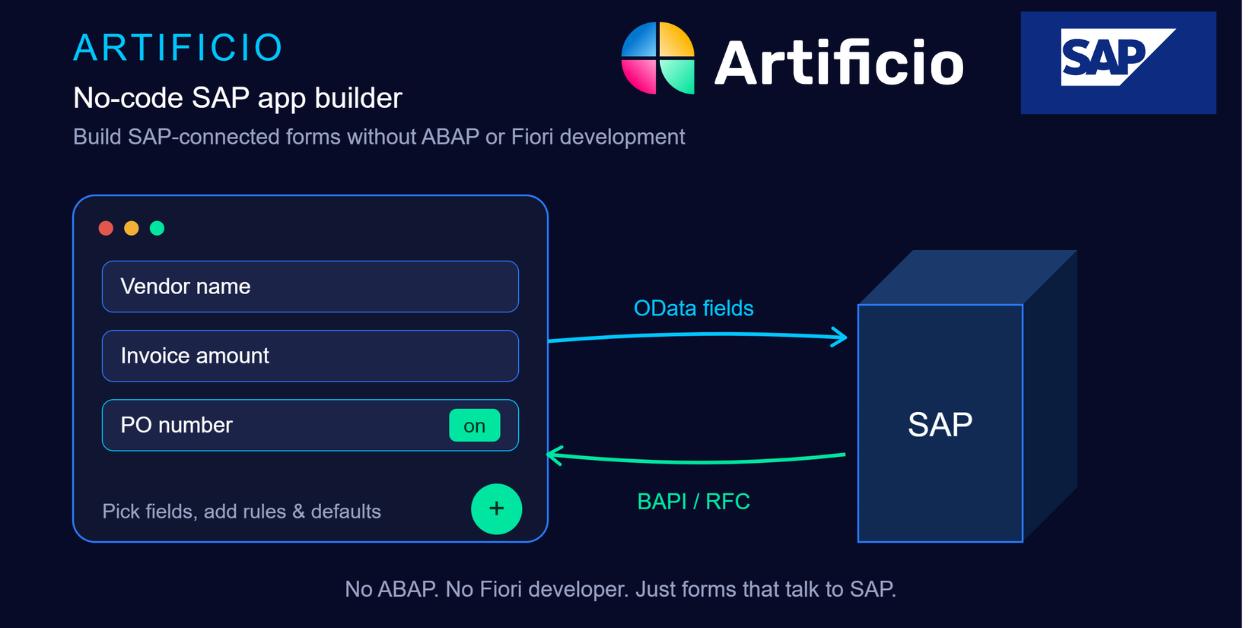
Artificio for SAP Automation
Artificio Forms connect to SAP via OData and BAPI/RFC, auto-extract data from documents, route through email approvals, and post directly — no developer needed.
IRVINE, CA, UNITED STATES, June 30, 2026 /EINPresswire.com/ -- Artificio Products Inc., a SAP PartnerEdge-certified provider of AI-powered Intelligent Document Processing (IDP) and workflow automation, today announced a new no-code app builder capability that allows business users to create custom forms and screens to fetch data from SAP or post data into SAP — without writing a single line of ABAP code or relying on a Fiori developer.
Historically, even a simple request — a form for warehouse staff to check stock levels, or a screen for plant technicians to log a maintenance issue — has required IT involvement, ABAP development, Fiori app deployment, and weeks or months of lead time. For many enterprises running SAP, this bottleneck means business teams either wait in an IT backlog or fall back on spreadsheets and email, both of which break data integrity and slow down operations.
Artificio's no-code platform removes that dependency by letting business users design forms directly from SAP's own data model. Users build a screen by selecting the relevant OData service fields, and the platform integrates the form with SAP through OData services as well as direct BAPI and RFC calls — covering both standard read/write scenarios and the more complex transactions that OData alone doesn't always expose.
Once the relevant fields are selected, users can build the actual form in one of two ways: by simply typing a plain-language AI prompt describing the form they want, with the platform generating the layout automatically, or by using a drag-and-drop builder to manually arrange fields, sections, and components — giving both non-technical and detail-oriented users a path that fits how they prefer to work. For example, a plant supervisor can type a prompt such as "create a form to log machine downtime with reason code and duration" and get a working, SAP-connected form in minutes — no developer ticket required.
Key capabilities include:
Field-level control — Users pick and choose exactly which SAP fields appear on a given screen, so each team sees only the fields relevant to its own business process, rather than a generic, cluttered SAP transaction screen.
Two ways to build — Once fields are selected, users can generate the form by typing an AI prompt describing what they want, or build it manually with a drag-and-drop designer — whichever fits how they work.
Rules, validation, and defaults — Forms can carry their own validation rules, conditional logic, and default values, so bad or incomplete data is caught before it ever reaches SAP.
Data transformation — Captured data can be transformed or reformatted in flight to match the structure SAP expects, reducing manual cleanup.
Multi-language support — Forms can be deployed in multiple languages, allowing global plants, vendors, and customers to use the same underlying SAP-connected app in their own language.
External collaboration — Vendors and customers can be brought directly into the workflow through shared forms and portals, rather than relying on email chains or third-party spreadsheets.
Document-based data extraction — Forms can be paired with Artificio's AI document extraction engine, so instead of manual keying, fields can be pre-populated automatically from uploaded invoices, purchase orders, contracts, or other source documents before the data is validated and posted to SAP.
Built-in email approval workflows — Each form can route through configurable, multi-step email approval workflows, so submissions requiring sign-off are automatically sent to the right approver and only post to SAP once approved, with a full audit trail of who approved what and when.
"For years, every SAP screen request has had to go through a developer queue, and most departments simply don't have the headcount or budget to justify it," said Lal Singh , Founder and CEO of Artificio. "Now a business user can build directly on top of SAP's own OData fields and BAPI calls, decide exactly which fields their team needs, add their own validation, pull data straight off a document instead of retyping it, and route it through an approval workflow before it ever touches SAP. It behaves like a purpose-built Fiori app with its own approval chain, without the development cycle or the generic, one-size-fits-all screen."
Enterprise Use Cases
Because the builder is not tied to a single module or department, enterprises are deploying it across a wide range of functions , including:
Vendor and Customer Onboarding — Self-service forms that collect vendor or customer master data directly from the external party, with validation rules and multi-language support, routed through an internal approval workflow before the record is created in SAP — significantly shortening onboarding time compared to manual email-based intake.
Material Master Creation — Multi-team data collection workflows where purchasing, engineering, quality, and finance each fill in only the fields relevant to their role, with the platform assembling and posting a complete material master record into SAP once all inputs are captured and approved.
Manufacturing Costing — Operator check-in/check-out screens on the shop floor that capture actual labor and machine activity in real time, feeding actual cost calculation back into SAP rather than relying on standard or estimated costs.
Procurement — Self-service forms for requesters to check PO and vendor status, or submit new purchase requisitions without logging into SAP GUI.
Plant Maintenance & Quality Management — Technician and inspector screens to log breakdowns, notifications, or quality results that post straight into SAP, with master data checks built in.
Sales Order Automation — Order entry and order-status screens for sales and customer service teams, with built-in pricing and stock validation.
Accounts Payable / Invoice Automation — Forms that extract invoice data automatically from uploaded documents, route exceptions through an email approval workflow, and post approved invoices directly into SAP, with holds for one-time payments or vendor exceptions handled the same way.
In each case, the same underlying pattern applies: a department that previously had to request a custom Fiori app or rely on manual workarounds can now stand up its own SAP-connected screen, with IT retaining oversight without owning every build — reducing both implementation time and ongoing development cost.
Artificio holds SOC 2 Type II, ISO 27001, HIPAA, and GDPR certifications, and maintains SAP PartnerEdge status, underscoring its focus on enterprise and regulated industries where data security and SAP-native integration are non-negotiable.
Lal Singh brings more than 22 years of SAP enterprise implementation experience — spanning SCM, PP, QM, and APO modules — from his prior work at IBM, TCS, Accenture, Deloitte, and L&T Infotech, where he served Fortune 500 clients including Ford, Nestlé, Campbell Soup, NVIDIA, and Estée Lauder.
About Artificio Products Inc.
Artificio Products Inc. is an AI-powered Intelligent Document Processing (IDP) and workflow automation platform built for enterprises running SAP and other ERP systems. The platform combines a no-code form and app builder, custom AI extraction models, SAP master data verification, and OData and BAPI/RFC-based integration to automate document-heavy and data-entry-heavy processes across finance, manufacturing, sales, and supply chain. Artificio is headquartered in Manhattan, New York, and holds SAP PartnerEdge status along with SOC 2 Type II, ISO 27001, HIPAA, and GDPR certifications. Learn more at https://www.artificio.ai.
Lal
Artificio Products Inc
+1 888-585-0140
email us here
Visit us on social media:
LinkedIn
Instagram
Facebook
YouTube
X
Other
SAP and Artificio revolutionize enterprise document processing and workflow Automation
Legal Disclaimer:
EIN Presswire provides this news content "as is" without warranty of any kind. We do not accept any responsibility or liability for the accuracy, content, images, videos, licenses, completeness, legality, or reliability of the information contained in this article. If you have any complaints or copyright issues related to this article, kindly contact the author above.
